Platform

Toolboxes module

Create, manage and share toolbox documents across your organisation. Give your team one central place to find the safety information they need, whenever they need it. The right knowledge, always within reach.

How the digital toolbox works

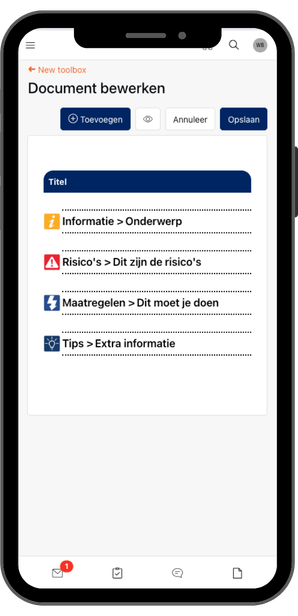
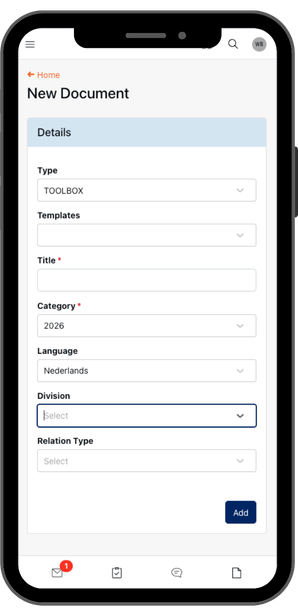
Create toolbox documents and share them with your team from the app or dashboard. The right safety information, accessible when it matters.

Use templates for speed and consistency on recurring topics. Customise anything to fit your needs. As an administrator, you can see which toolboxes are available and how often they've been opened.

Benefits of the toolboxes module

Think of it as your safety library. Your team always has access to current toolbox documents, instructions and explanations. You can see who's read what, so you know how safety knowledge spreads across your organisation. All without replacing mandatory physical toolbox meetings.
All toolbox documents organised and available digitally.
Less admin, always up-to-date safety information.
One overview of every toolbox in your organisation.
Safety information available anytime, anywhere.

Toolboxes in practice

Share the right safety information at the right moment.

Seasonal conditions

Cold weather ahead? Publish a toolbox on working safely in frost and ice, so your team can prepare.

Refreshing knowledge

An employee needs to do welding work after a long break. They open the app, find the safe welding toolbox, and review it on the spot.

New instructions

Working conditions changed? Update a toolbox or create a new one. Everyone works with the same information, straight away.

Work with fixed topics or adapt existing templates to the situation. Safety information stays recognisable, current and ready to use.
Construction

Templates for consistency and customization

Templates let you move fast on recurring topics without starting from zero. Customise any template to match the situation. Administrators can see which toolboxes are available and how often they've been read.
Construction workers

Configured for you

Create your own toolbox topics and work with digital templates, so safety information stays recognisable and current across your organisation.

The toolboxes module sits alongside meetings, inspections, LMRA and reports in the same SafetyFirst environment. One place for all your safety information, without unnecessary complexity.

Templates for consistency and customization

Thanks to toolbox templates you work quickly and consistently with fixed topics, while customisation always remains possible. Administrators have insight into which toolbox documents are available and to what extent they have been consulted.

Configured for you

The toolboxes module is configured to match the practice of your organisation. You can create your own toolbox topics and work with digital toolbox templates, so that safety information remains recognisable and current.

The toolboxes module is used within the same SafetyFirst environment as other safety modules, such as Meetings, Inspections, LMRA and Reports. By using these modules side by side, one central place is created where employees have access to relevant safety information.

This supports safe working in a way that fits daily practice, without unnecessary complexity.

Toolboxes in practice

Toolbox documents are used in practice to inform employees at the right moment about specific safety risks. The Toolboxes module supports this by making current safety information easily available, exactly when it is needed. You can work with fixed toolbox topics or adapt existing toolbox templates to the situation. This way, safety information remains recognisable, current and directly applicable in practice.

Example 1

Cold and frost are coming. A toolbox document about safe working in cold and slippery conditions is made available, so employees can prepare for the risks.

Example 2

An employee needs to perform welding work and hasn't done this for a while. Via the app he can easily look up and consult the Safe Welding toolbox.

Example 3

With changing working conditions or new instructions, a relevant toolbox can quickly be added or updated, so everyone works with the same information.

Want to see how easy digital toolbox management can be?

Request a demo or download the brochure.

Frequently asked questions

How do I create a new toolbox document?

From the app or dashboard. Choose a topic, use a template if you want, add your safety content, and publish it to users.

What is the purpose of the toolboxes module?

A central library for safety information and toolbox documents. Your team can look up what they need at any time, so they start work informed and aware.

Can toolbox documents be consulted by employees?

Yes. toolbox documents are available in the SafetyFirst app. Employees can look up important safety information whenever they need it.

Is insight into the use of toolbox documents possible?

Yes, administrators can see which toolboxes are available and how often they've been consulted. This helps you ensure safety knowledge reaches your whole team.

Does the toolboxes module replace physical toolbox meetings?

No, it's a supplement. Physical toolbox meetings that are required by your industry regulations remain necessary and are supported through the meetings module.

Still have a question?

We’d be happy to hear from you and assist you further.