Platform modules

Meetings module

Keep safety knowledge in one place. Record every meeting digitally: who attended, what was shared, and what was agreed. From toolbox meetings to kick-offs, project starts and QHSE sessions. Digital attendance registration means less paperwork, fewer errors, and a clear record for every meeting.

Group of construction workers wearing hard hats and safety vests standing on railway tracks during a meeting.

Digital attendance registration for meetings

The meetings module is developed for professionals who take safety and knowledge seriously, such as QHSE managers, site managers, safety professionals, project managers and employees who regularly organise toolboxes or work meetings. Digital attendance registration of personnel provides overview and reliability. No more loose lists, no illegible signatures and no doubt afterwards. Everything is centrally registered and immediately available.
The benefits of attendance registration software at a glance:
  • Accidents
  • Near-accidents
  • Unsafe situations
  • Safety observations
Two construction workers wearing helmets and safety gear working on metal scaffolding against a clear blue sky.

Benefits in practice

Digital attendance registration that's fast, reliable and paperless.
Quick scanning with the SafetyFirst app.
No more paper attendance lists.
Fewer errors, direct proof of attendance.
Works for small and large groups.
Construction workers

Joining a meeting in the app

After registering, participants automatically see everything linked to that meeting. Each person only sees meetings they actually attended.
  • Documents and toolboxes
  • Instructions
  • Meeting details
  • Tasks
Construction

Documentation, toolboxes and notes directly linked

Link all relevant information directly to each meeting.

Tasks and notes can be recorded directly from the meeting, so nothing gets lost and follow-up stays on track.
  • Toolbox presentations
  • Instruction documents
  • Procedures
  • External attachments
Group of construction workers wearing white safety helmets and vests viewed from behind, with blue check marks above their heads on an orange background.

Key benefits of attendance registration

  • Less administration, more overview
  • Documentation and toolboxes linked to the right meeting automatically
  • Record tasks and notes on the spot
  • Export attendance lists and data easily
  • Advanced permissions and privacy settings

Attendance registration in practice

Fast, reliable and fully digital.

Toolbox meeting on site

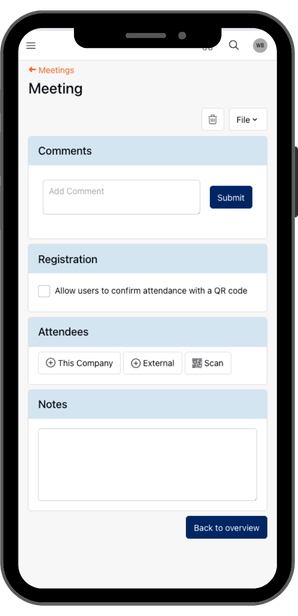
Share a QR code at the start of the meeting. Attendees scan it with the SafetyFirst app. Attendance is registered instantly and linked to the toolbox and instructions.

Project kick-off

The instructor scans each participant's QR code on the spot. The attendance list is complete immediately, including linked documentation and action points.
Group of construction workers wearing white hard hats and safety vests facing away against a bright orange background with abstract circular designs.Back view of workers wearing white helmets and safety vests attending a meeting with construction and communication icons on an orange background.Back view of workers wearing safety helmets and vests with check marks above them on an orange background.Illustration of a tablet with a central construction helmet icon surrounded by six black circles featuring various construction and management icons on an orange background with abstract circular and dotted patterns.

Documentation, toolboxes and notes directly linked

For every meeting you can record and link all relevant information, such as:
  • Toolbox presentations
  • Instruction documents
  • Procedures
  • External attachments

Participating in a meeting in the app

After registration, participants automatically get access to everything that belongs to the meeting. Thanks to the advanced permissions structure, each user only sees information from meetings they actually attended.
  • Documents and toolboxes
  • Instructions
  • Meeting details
  • Any tasks

Key benefits of attendance registration

  • Less administration, more overview.
  • Automatic linking of documentation and toolboxes.
  • Tasks and notes recorded directly.
  • Easy export of attendance lists and data.
  • Advanced permissions and privacy settings.

Attendance registration in practice

How does using attendance registration software work in practice? Below we have worked out two examples for you. In both cases, registration is fast, reliable and completely digital.

Toolbox meeting on the construction site

At the start of the toolbox meeting, a QR code is ready. Employees scan it with the SafetyFirst app. Their attendance is immediately registered and linked to the toolbox and instructions.

Project start in a technical room

Participants enter and the instructor scans the QR codes of all attendees on the spot with the app. The attendance list is immediately complete, including documentation and any action points.

Want to see how simple and structured safety meetings can be?

Request a demo or download the brochure.

Frequently asked questions

How does digital attendance registration work?

By scanning QR codes, the app automatically registers all attendees.

Can I add participants manually?

The instructor can also register participants without a QR code.

Is this suitable for construction?

The module is widely used for toolbox meetings at construction sites, but works for any type of safety meeting across industries.

Can documents or toolboxes be added?

Yes, every meeting can be linked to documents, instructions or external attachments.

Can I download an attendance list?

Admins can export all data and attendance lists.

Still have a question?

We’d be happy to hear from you and assist you further.